Here's What's New in 4M: April 2026
Written by

Nicole Heger
Published on
.svg)
April 29, 2026


Table of contents
April brought some of our most enterprise-ready updates yet, giving teams tighter control over how data is ordered and how organizations do reporting, and a big leap in 4M’s utility evidence for poles. From a new approval workflow that keeps segment consumption in check to a pole intelligence upgrade that's cutting investigation time in half, this month's releases are built for teams working at scale. Here's what's new.
New Features and Updates
Data Ordering Approval Workflow
Large organizations need a way to control how and when utility data gets ordered, especially as teams grow and project consumption becomes a shared resource. With the new Data Ordering Approval Workflow, Admins can now require that Foundation and/or Validated Data orders go through an approval step before processing.
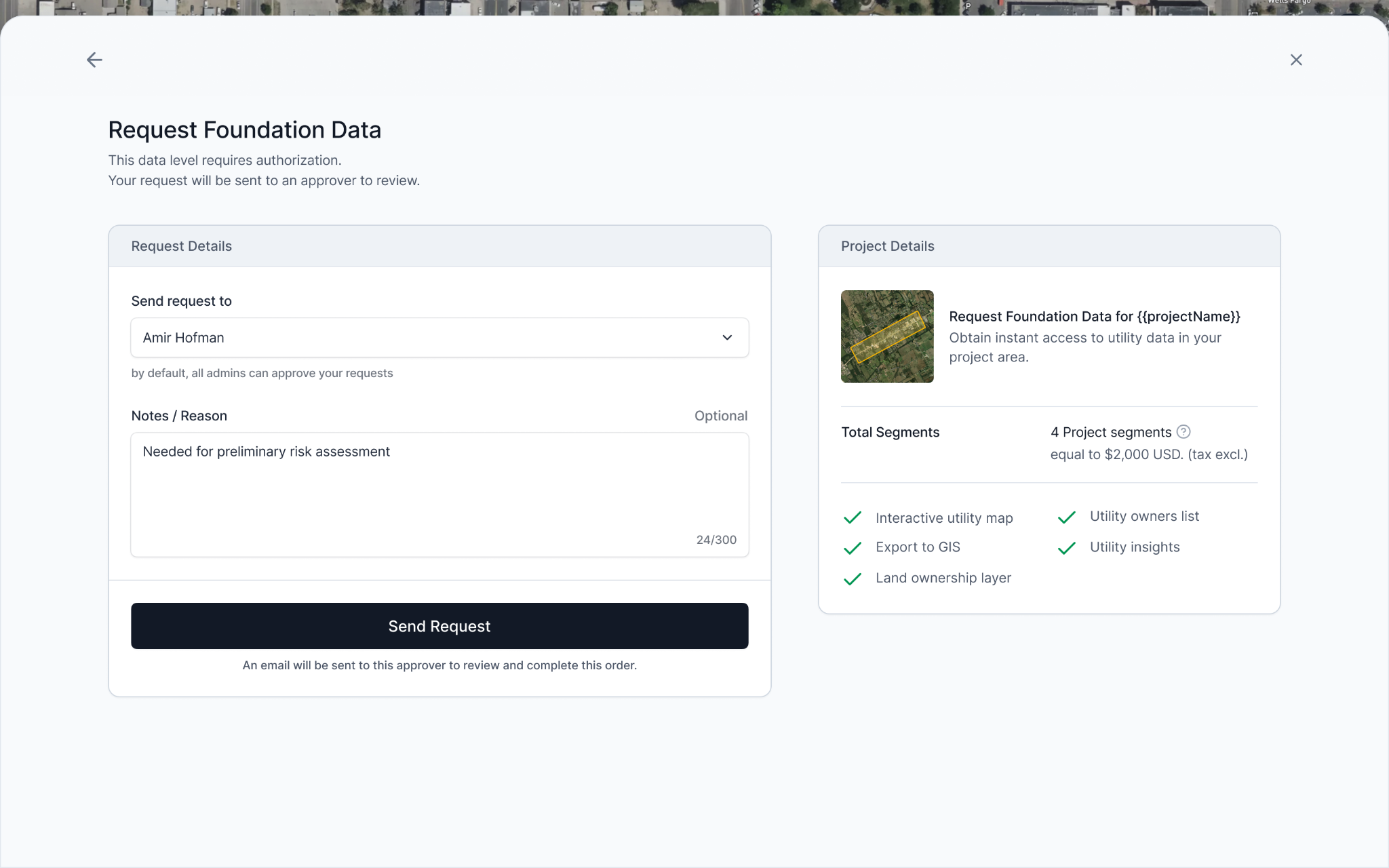
Here's how it works:
- Users without ordering permissions can draw a project area, preview the heatmap, and submit a data request with context for their approver.
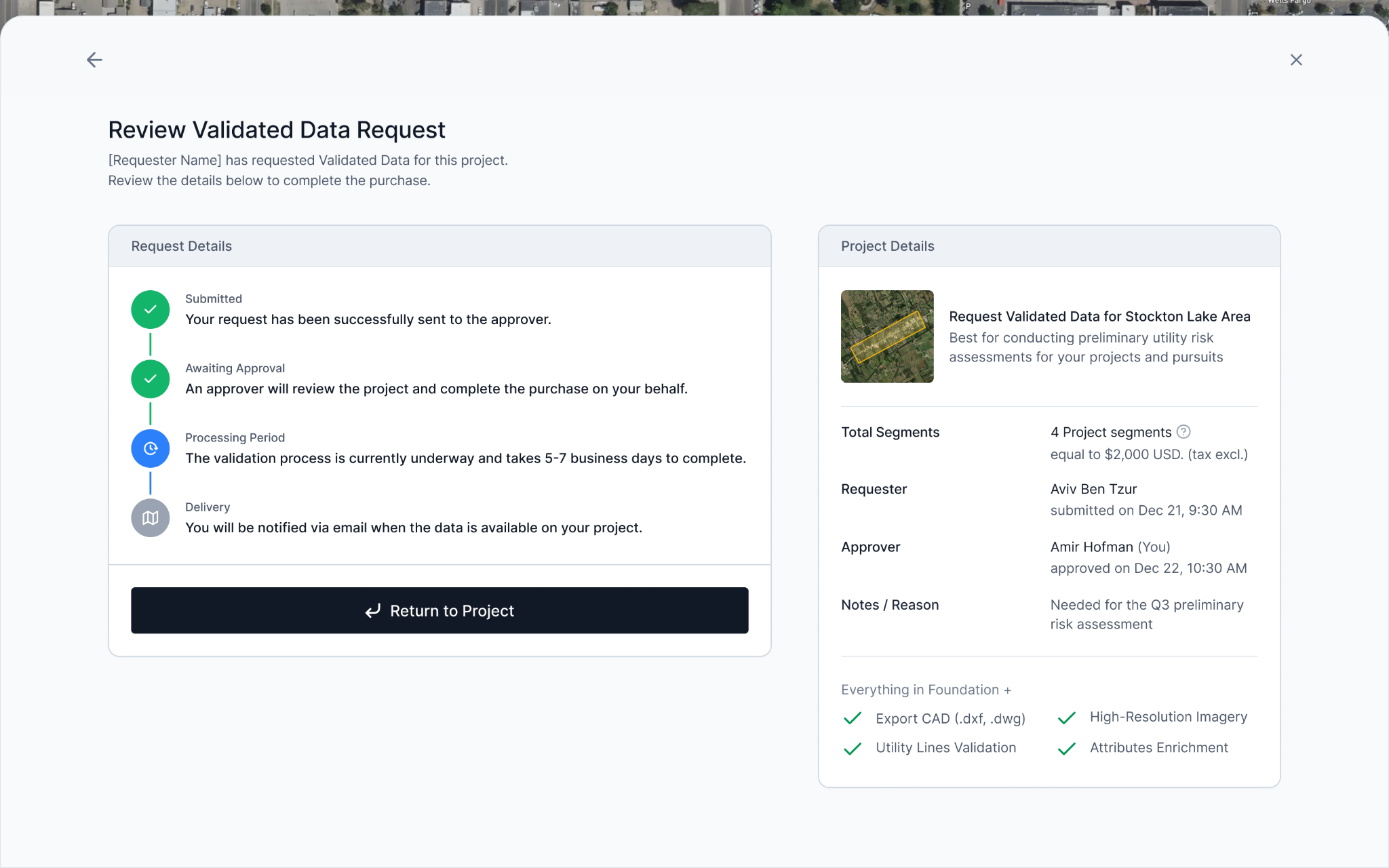
- Admins and designated approvers receive the request, review it, and approve, all inside 4M.
- Once approved, the data is ordered automatically, including Object Detection.
This workflow is designed to remove bottlenecks while keeping consumption controlled. Teams can now scale access broadly without the risk of unintended orders, making it easier to bring in more users and give stakeholders visibility.
Why This Matters
For enterprise accounts managing large teams, uncontrolled ordering creates headaches for Admins. The approval workflow gives organizations a structured, low-friction way to let everyone explore 4M while keeping ordering authority where it belongs.
Learn more in this help article.
Customization
Enterprise organizations don't all look the same, and now 4M doesn't have to either. Customization gives Admins the ability to define custom fields for both users and projects, capturing the context that matters most to your organization directly inside the platform.
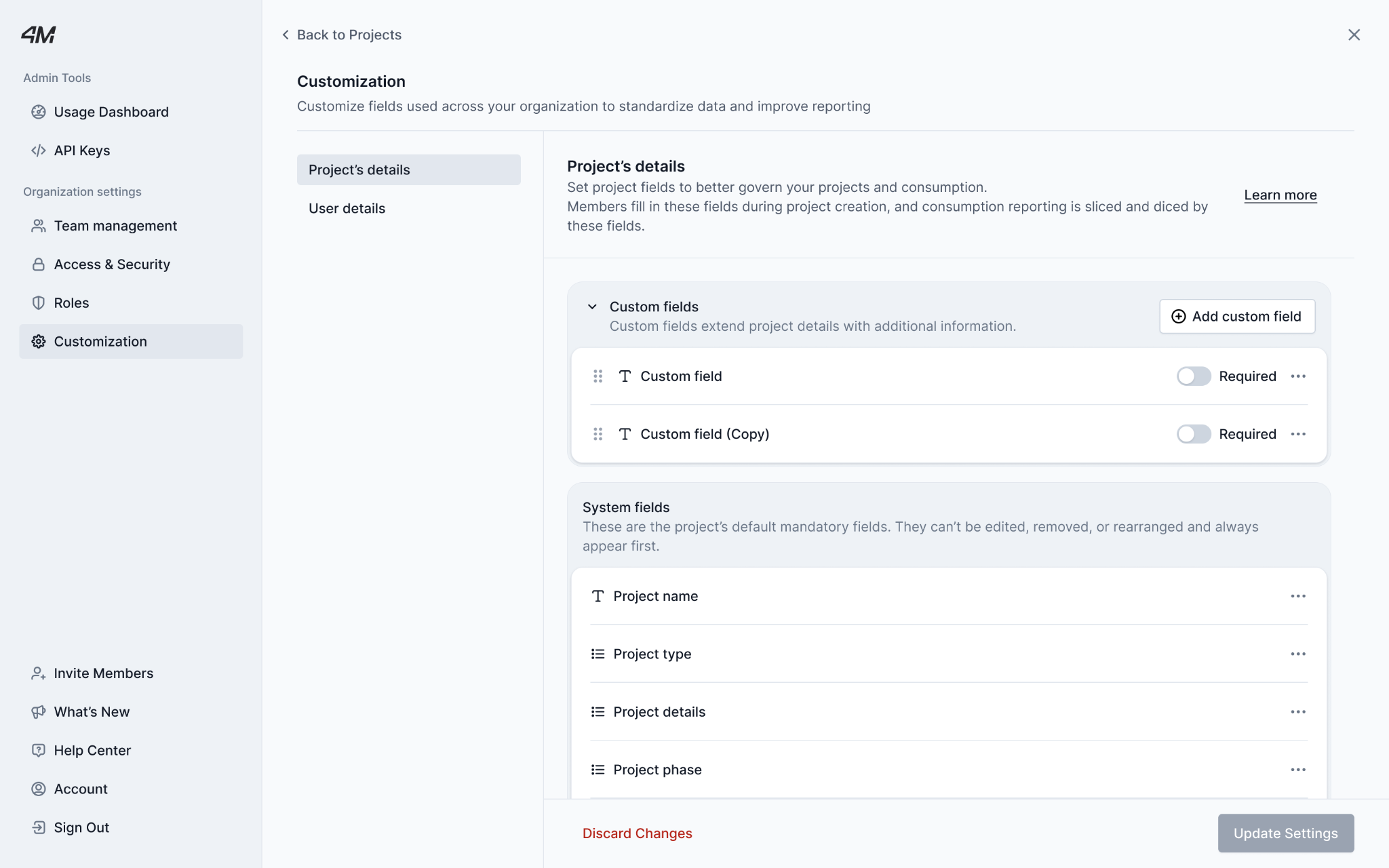
- User Details: Add custom fields to user profiles — things like district, region, department, or business unit — so you always know who's using 4M and where.
- Project Details Define required or optional fields at project creation — such as proposal number, client name, business line, billability — so usage data maps directly back to how your organization tracks and reports work.
Custom fields support text, yes/no, dropdown, and phone formats. Any input can be generated in a download (which you can get only by reaching out to your CSM at this time), making it easy to slice usage by the properties that matter to your team.
Why it matters: Without custom fields, teams track project context in separate spreadsheets or skip it entirely. That creates gaps in cost attribution, inconsistent reporting, and friction between the people using the platform and those responsible for demonstrating its value. Customization closes that loop, connecting 4M usage to internal workflows without any off-platform tracking.
Note: Custom fields apply to new projects and users going forward. Existing records are not updated retroactively.
Learn more in this help article.
New in Object Detection: Pole Attachments & Attributes
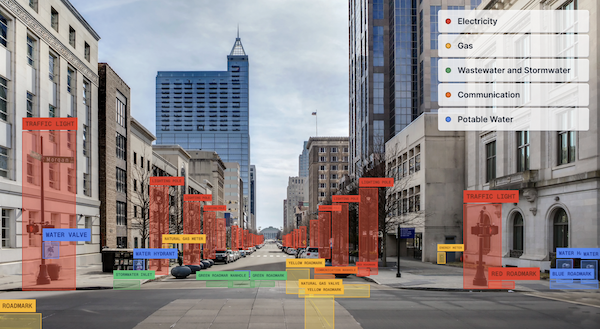
Poles are a critical part of infrastructure projects, and what's attached to them matters. This month, 4M's Object Detection got a major upgrade: you can now see pole attachments and attributes directly on the map. When you click on a detected pole, you'll see a structured breakdown of what's on it, including attachment types and key attributes, giving planning and design teams immediate context without a single field visit.
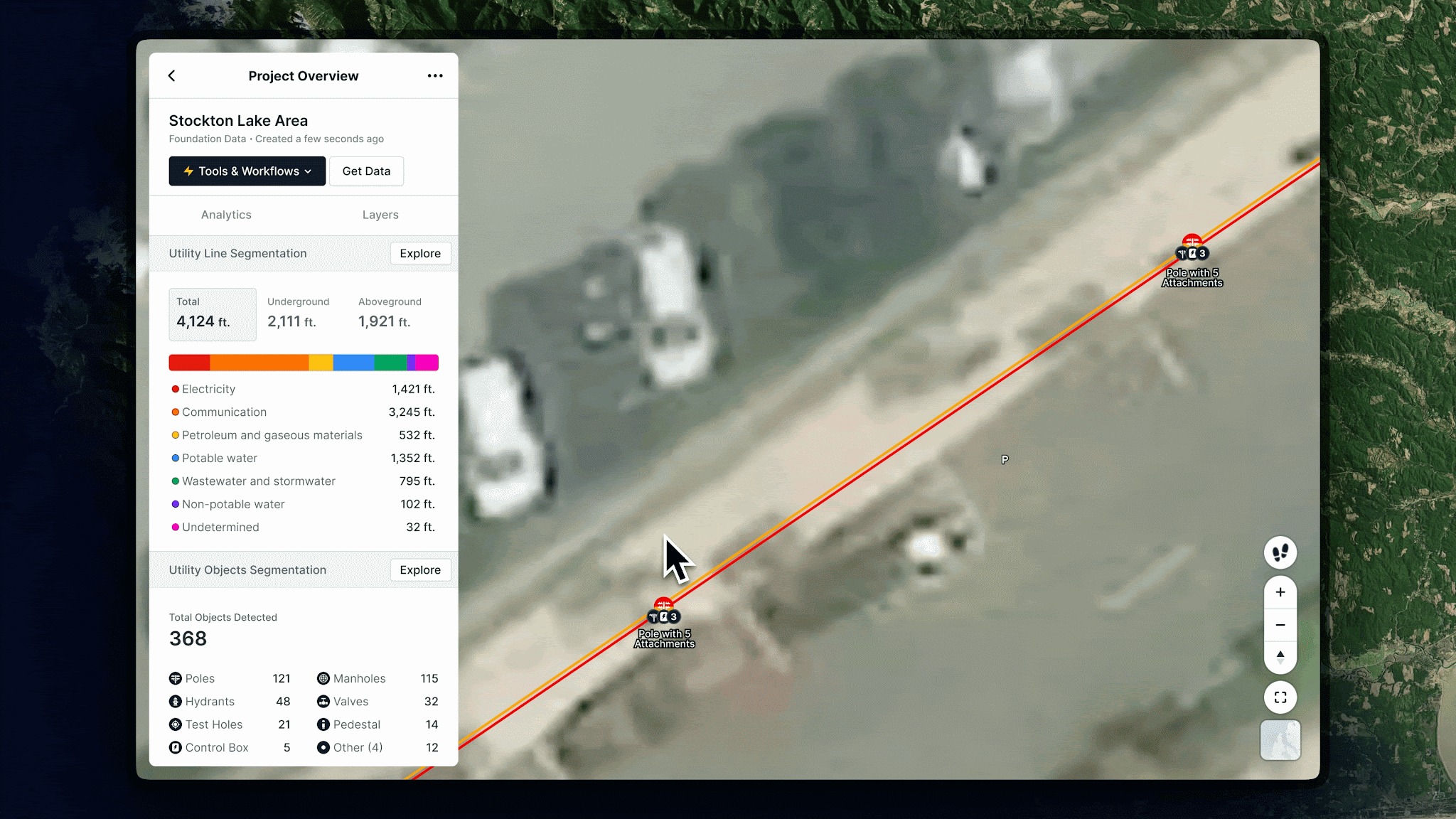
Early feedback from customers points to an estimated 80% reduction in field investigation time for pole-related work. Instead of dispatching investigators to walk poles one by one, teams can now identify which poles have relevant attachments before anyone mobilizes.
Why it matters: Pole relocation, traffic signal planning, and T&D corridor design all depend on knowing what's on a pole before the job starts. Until now, that meant sending someone to the field. This capability unlocks new use cases for transportation, traffic, and transmission teams, and is expected to be highly impactful for engineering workflows.
Note: Pole attachment data is available now to all new projects as part of Object Detection. Download support via GIS/metadata export is coming in the next few weeks.
Site Connect — 4M × Trimble Integration (Early Access only)
4M and Trimble are now connected. With Site Connect, 4M's verified utility data flows directly into Trimble's ecosystem, including Trimble SiteVision for augmented reality field visualization and Trimble Teraflex, bridging the gap between desktop planning and on-site execution.
Using your existing WFS/API connection, you can push 4M utility data into Trimble Connect and bring it into the field as a georeferenced, visual layer. Field teams can then view utility lines, objects, and evidence in context, overlaid on the real world through SiteVision, before digging, locating, or making any design decisions.
Note: This integration is in Early Access and currently available to a limited set of customers. Ask your CSM for more information to stay updated on when this feature will be widely available.
See you next month
April's releases reflect where 4M is headed: more intelligence, more enterprise readiness, and tighter integration with the tools and workflows your teams already rely on. Whether you're managing a large account with dozens of users or putting 4M data in the hands of a field crew for the first time, these updates are designed to help your team move faster and with more confidence.
As always, if you have questions about these updates or want to learn more, reach out to your Customer Success Manager or explore our help center for step-by-step guidance.

Recent blog posts

.png)
.svg)



.png)

Our Newsletter
Join 7k infrastructure professionals
Get monthly insights on ways to build smarter, faster and safer with Utility AI.